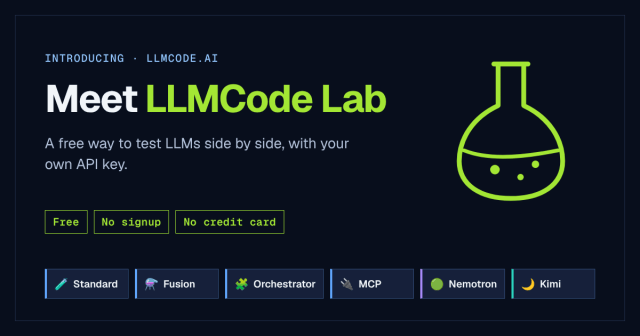
AI is changing how we work every day. I want to take this opportunity to share some of what I am working on. LLMCode Lab is a free testing lab for large language models. You bring your own API key, pick up to five models from HuggingFace, OpenAI, Anthropic, and Google, send them all the same prompt, and read the answers side by side, with what each one costs. Calls go straight to the providers at their published rates, and the open-source models on HuggingFace are free to run. There’s no signup.
Around that core, five more labs each take on one kind of question: Fusion, Orchestrator, MCP, and dedicated labs for NVIDIA’s Nemotron and Moonshot’s Kimi.
This post covers what has changed lately and introduces a sister site for planning what an AI feature will cost before you build it. I created this site because I wanted one place to evaluate the models that matter, without bouncing between tabs. Let’s take a closer look. I’ll share my latest updates and my new site.
New models, and the first live test that earned its keep
In early September, I added GPT-6 Astra and Claude’s September lineup: Fable 5.1, Opus 5, and Sonnet 5. They’re in the model lists and the cost tracking, and Fable 5.1 and GPT-6 Astra are now options for Fusion’s synthesis model.
The part I want to tell you about is that answers from Fable 5.1 were coming back blank in the lab. It turned out Fable 5.1 is the first Claude model whose response leads with something other than text, and my code read the response as if the text always came first. Documentation can tell you a model exists, but it can’t tell you what shape its answer arrives in.
I fixed the parsing and added a test. I also changed my own rule for adding models: checking the official docs isn’t enough anymore. A new model isn’t done until one real prompt has gone through it in the lab and I’ve seen the answer on the screen. Yes, I am learning along the way, and that’s always a good thing.
Knowing whether a model is still there
Models come and go, and a lab full of models that no longer answer isn’t much of a lab. Two things changed here.
- A daily check. Every day, the lab pings its models with a small set of test keys of my own, separate from anything you enter. If a check fails because of a setup problem or a temporary hiccup, it doesn’t mark the model as gone. A model that has been discontinued is never switched back on automatically either. There’s also a “Run Check Now” button in the admin panel for when I don’t want to wait.
- Retirement dates. The Model Availability page shows a warning on any model that retires within the next 120 days, with the date. When the provider has only given a “no earlier than” date, the page says “on or after,” because that’s what is actually known.
Before you paste a key
Your keys have always stayed in your browser, and I’d like to be precise about what that means. They’re held in browser storage with a 24-hour expiry. When you run a prompt, the key travels with the request through the lab’s server to reach the provider. It’s never written to a database or to disk.
What’s new is a nudge before you paste anything. Under each provider’s key box, there’s now a short note on how to cap spend: a capped Project for OpenAI, a workspace with a spend cap for Anthropic, and a monthly cap in AI Studio for Google. If you’d like a limit on what a key can spend, you can set it up before the key ever reaches the lab.
The smaller things
- Nemotron 70B was removed from the selectable models.
- Shared links now show a preview image of the flask.
- The landing page and user guide now include a Support link.
- A thin announcement bar on the landing page points out the new models.
A sister site: askmodel.dev
askmodel.dev answers a different question: before you build a feature, what will it cost? It’s free to use, with no signup.
You tell it what you’re building, and it gives you a monthly cost range, a starting model, and a starter stack. You can start from one of five example workloads, or describe what you’re building in a sentence. Then you can pick the coding tool you use, add usage details for a sharper estimate, and look at the charts, the side-by-side comparison, the suggested tools, and the assumptions behind the number. There’s also a quick calculator, a models page with every price, and a two-minute video showing how to use it on its How it works page.
The two sites point at each other. LLMCode Lab is where you try models with your own key, and askmodel is where you plan what a feature will cost before you build it. Each one links to the other from its footer.
They also keep each other honest. The lab’s daily check now compares its price table against askmodel’s model feed and reports where the two disagree, where askmodel lists a model the lab doesn’t, which models are overdue for re-checking, and any price changes coming in the next 30 days. It only reports. I only change a model or price after I’ve checked the provider’s own page.
An estimate is still an estimate, and askmodel says so on every result. Please confirm any price with the provider before you build.
What this resource provides to developers
I want as many people as possible finding out what actually works for them. Free to use isn’t free to build. API calls during testing, hosting, and keeping up with new releases it all adds up. I decided to create a door instead of a wall. I want to do what I can to keep the path open. This is my contribution.
Try the lab at llmcode.ai, and plan what you want to build at askmodel.dev.
Discover more from MsTechDiva
Subscribe to get the latest posts sent to your email.